Information tab
In this tab, you can review and manage your WoFi device(s).
The interface includes the following elements (detailed below):
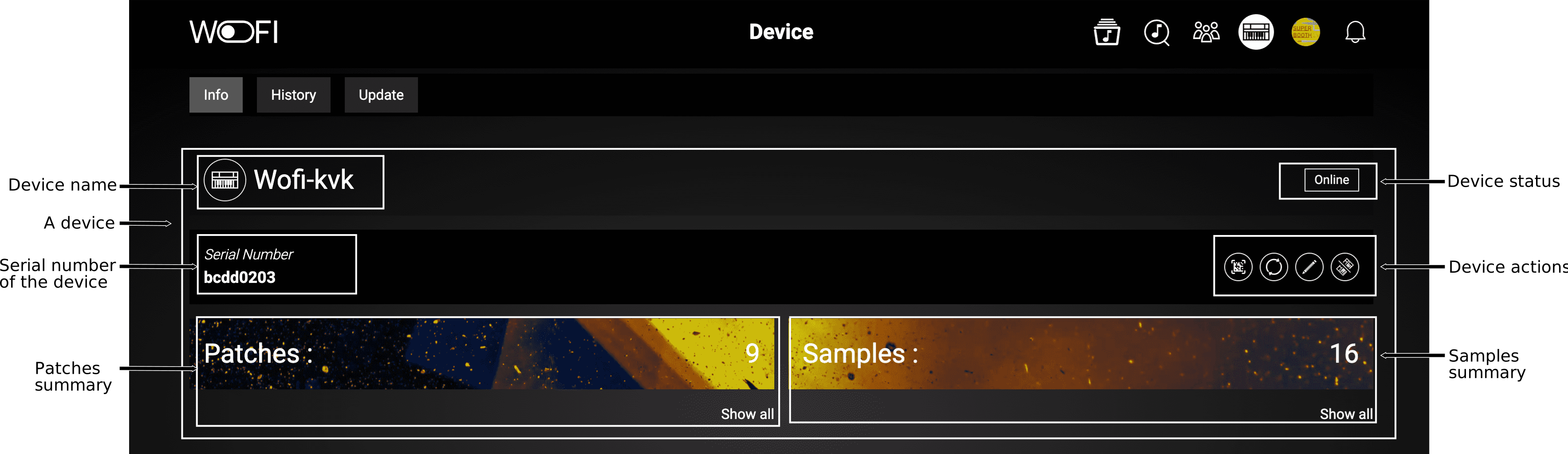
Clicking on Show All under patches and/or samples lets you explore the full list of patches and samples on your device.
Device actions
Below is a list of actions available for managing your devices and their respective functions:
| Icon | Name | Description |
|---|---|---|
 |
Retrieve Device Logs | Allows you to download all the device logs as a zip file. |
 |
Refresh Device Content | Only available if the device is online. Updates all information about the current device content. |
 |
Change Device Name | Allows you to rename the device as it appears in your list. |
 |
Unpair Device | Allows you to unpair the device from your account. |