FAQ
Content
1. Sound Issues
- Why is my WoFi not producing any sound?
- What should I do if the left speaker does not produce any sound?
- How do I mute speaker output if headphones are plugged?
- Why is my WoFi hissing and stay frozen at startup?
- Why are my recorded samples distorting or clipping?
- What should I do if the sound output is inconsistent or imbalanced?
- How do I troubleshoot issues with sound playback cutting out?
- How do I use WoFi's sampling capabilities?
- The Texturer doesn't change the sound, what should I do?
- The LFO doesn't seem to work correctly, what can I do?
- Why can't I see the value changed by LFO?
- The editing of notes or parameters on the sequencer is odd; it seems to have no effect on the pads?
- Notes seem "frozen" and I can't stop the sound, what can I do?
2. Interface
- How do I make a successful recording?
- What can I do if the record does not start properly?
- The parameter don't change proportionnaly to the rotation of the encoder
- Why can't I edit some samples
3. Connectivity Issues (Audio and MIDI)
- How do I resolve connectivity issues with MIDI devices?
- Why does WoFi not respond to my MIDI controller?
- How do I troubleshoot connectivity issues with WoFi's USB ports?
- How do I configure WoFi for use with external synthesizers?
4. Storage and Memory Management
- What should I do if my samples or patches are not loading properly?
- How do I insert properly the memory cartridge?
- Why is my WoFi not displaying or recognizing the cartridge?
- How do I manage and optimize storage on WoFi?
5. Firmware and Updates
6. WiFi and mywo.fi
- How to setup the link between my WoFi and mywo.fi?
- What should I do if my WoFi is not connecting to WiFi?
- How can I fix WiFi connectivity issues with mywo.fi?
- How can I improve the WiFi connection stability on WoFi?
7. Battery and Power Management
8. General Maintenance and Protection
9. Troubleshooting Hardware Issues
- What should I do if the WoFi does not power on?
- What should I do if the WoFi overheats?
- What should I do if the pads, buttons, switches, encoders, or faders are unresponsive?
- How do I perform a factory reset on WoFi?
Answers
Why is my WoFi not producing any sound?
- Ensure the volume is up, and check audio outputs and internal speakers.
- Check that the loaded sample is not empty, nor the cue points set to a silent area.
- Check that the envelope's attack is not too high, as this could delay the sound for several seconds.
- Check that the sequencer is not running with 0 notes on its 16 steps.
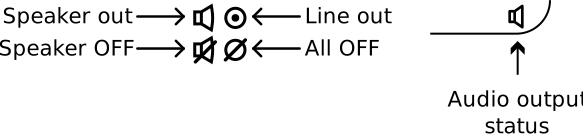
The dashboard displays the current status:
What should I do if the left speaker does not produce any sound?
The left-side of the keybed is reserved for the embedded microphone. For this reason, the WoFi only embedds only one speaker.
It is used for monitoring only, with a limited response in bass frequencies.
Note also that the embedded microphone is monophonic.
How do I mute speaker output if headphones are plugged?
Double clicking on LFO-saw toggles the speaker output for quiet usage with headphones only:

Why is my WoFi hissing and stay frozen at startup?
The monitioring of the embedded li-ion battery is not instantaneous. It also can occurs such situation, where the battery is not charged enough to support a full startup. This can lead to strange behaviour such as slider values always evolving or unstable encoders.
Turn off the unit and plug the AC adapter. If the unit is full discharged, wait a few minutes before starting.
NB: The device can charge from USB link, but it is less efficient than AC adapter.
Why are my recorded samples distorting or clipping?
Before recording
Check recording levels and use input gain adjustments when you record a sample.
When the rec button is blinking, you can adjust the gain. There is visual feedback for clipping, but you can also monitor the sound directly by activating the option in the general menu.
After recording
Playing several samples at the same time can lead to clipping. It the recording was correctly achieved without clipping, the level can be normalized from Sample export, from the online sample editor in mywo.fi, or with any external audio editor.
What should I do if the sound output is inconsistent or imbalanced?
Verify balance settings and inspect external equipment or cables.
How do I troubleshoot issues with sound playback cutting out?
The WoFi is a really permissive device. Thus, cumulating SINC interpolation, high envelope release, high pitch samples with low reference notes, high stretch factor, high polyphony can lead to DSP limits.
This can have for consequences glitches or clipping in the final output.
Reduce simultaneous voices, adjust reference notes or lower release can solve this issue.
How do I use WoFi's sampling capabilities?
Choose your audio source with the toggle switch on the bottom left of the front panel. Press rec once to monitor your audio input level, press again to start recording, and once more to stop recording. For more details, refer to the WoFi manual's extensive tips on sampling.
The Texturer doesn't change the sound, what should I do?
The texture effects relies on the sample shape: for exemple results will be less audible for soft drones than for short attack samples.
Increase the depth of the parameters and the other values. You will then notice changes.
The LFO doesn't seem to work correctly, what can I do?
Check the LFO parameters:
- "LEARN" button must be ligthen: if the LFO has no target, it will have no effect.
- If the "SYNC" is enabled, the LFO will need the sequencer to be active.
- Check the target level: if the LFO range is out of audible effect range, the LFO will have no listenable effect, this occurs especially with cutoff. Change the cutoff level to solve this "issue".
Why can't I see the value changed by LFO?
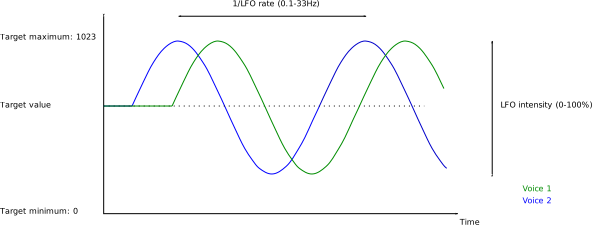
The LFO applies to each enabled voice.
The phase of the automation is also not the same for each voice, and thus the value of the automated value will be different for each voice. This is why the real value used is not shown in the display.
In other words, even if rate and intensity are common parameters for the voices when LFO is enabled, each voice has its self evolving value, like shown below:
The editing of notes or parameters on the sequencer is odd; it seems to have no effect on the pads?
Double-check that you are in the correct mode (Steps) and displaying the correct sequence (Note vs Param). Also, ensure that EDIT is on.
Notes seem "frozen" and I can't stop the sound, what can I do?
This can be normal when playing notes and transposing simultaneously, as WoFi will hold the notes until you return to their original octave.
Press SHIFT + CLOUD to quickly stop all notes.
How do I resolve connectivity issues with MIDI devices?
Ensure MIDI cables are properly connected and the correct channel is set. Check WoFi's general MIDI settings to ensure you haven’t turned off any signal streams.
Why does WoFi not respond to my MIDI controller?
Check MIDI channel and connections, and verify that your controller's settings match the channel and CC values. You can edit all CC values in WoFi’s general menu.
How do I troubleshoot connectivity issues with WoFi's USB port?
Try switching USB ports, checking cables, and connecting with different devices.
How do I configure WoFi for use with external synthesizers?
Set the correct MIDI channels and check input/output connections. Please refer to the manual for more detailed information on connections.
How do I make a successful recording?
- Step 1: Choose to input: Line or Embbedded microphone
- Step 2: Select the reference note for the record by pressing a key
- Step 3: Press REC button once to arm the recorder
- Step 4: Adjust the gain level using the potentiometer
-
Step 5: Start the recording:
- Manualy: Hold down the rec button, the record will start when you will release the button. The reason of this behaviour is to avoid the noise of the button pressed-released at the start of the record.
- MIDI triggered record: If you have a MIDI keyboard plugged, press shift, the record will be triggered by the next MIDI note ON message
-
step 6: Stop the recording
- Manualy: Press rec or exit button
- MIDI triggered record: If you hold down the shift button, the next note OFF will stop the recording
Status: Recorder armed: the rec button is blinking Recorder is recording: the rec button is continuously light ON
Note The MIDI triggered mode is very useful when sampling MIDI device that is driven by the same keyboard.
What can I do if the record does not arm properly?
During the arm process, a new file is allocated for recording.
If a file error occured previously, a new file won't be allowed.
Restart the device to recover a normal state.
If the file system is full, a new file won't be allowed.
Check the remaining size on the device in Settings / Info view
The parameter don't change proportionnaly to the rotation of the encoder
In order to match large range and also have fine tune possibilities, the rotation of the encoders is used with the acceleration.

Quick rotation will result in large variation of the parametere, while slow rotations will allow to fine tune the values.
Why can't I edit some samples?
Some samples appears has readonly files, there is a lock pictogram to indicate this status.

The reason is that you are not the owner of these samples, either because they come from a factory patch, or because they were shared to you.
These samples can be used in your patchs, but it is not possible to edit/save them to protect intellectual property.
What should I do if my samples or patches are not loading properly?
Ensure files are stored correctly and in a compatible format:
- Files uploaded through mywo.fi are automatically converted.
- Files uploaded through WoFiManager application must be properly conveted to 48kHz, mono.
Note: sample normalization is recommended to avoid saturation when playing simultaneously notes with mow pitch difference. Normalizing at -3dB give correct results.
How do I insert properly the memory cartridge?
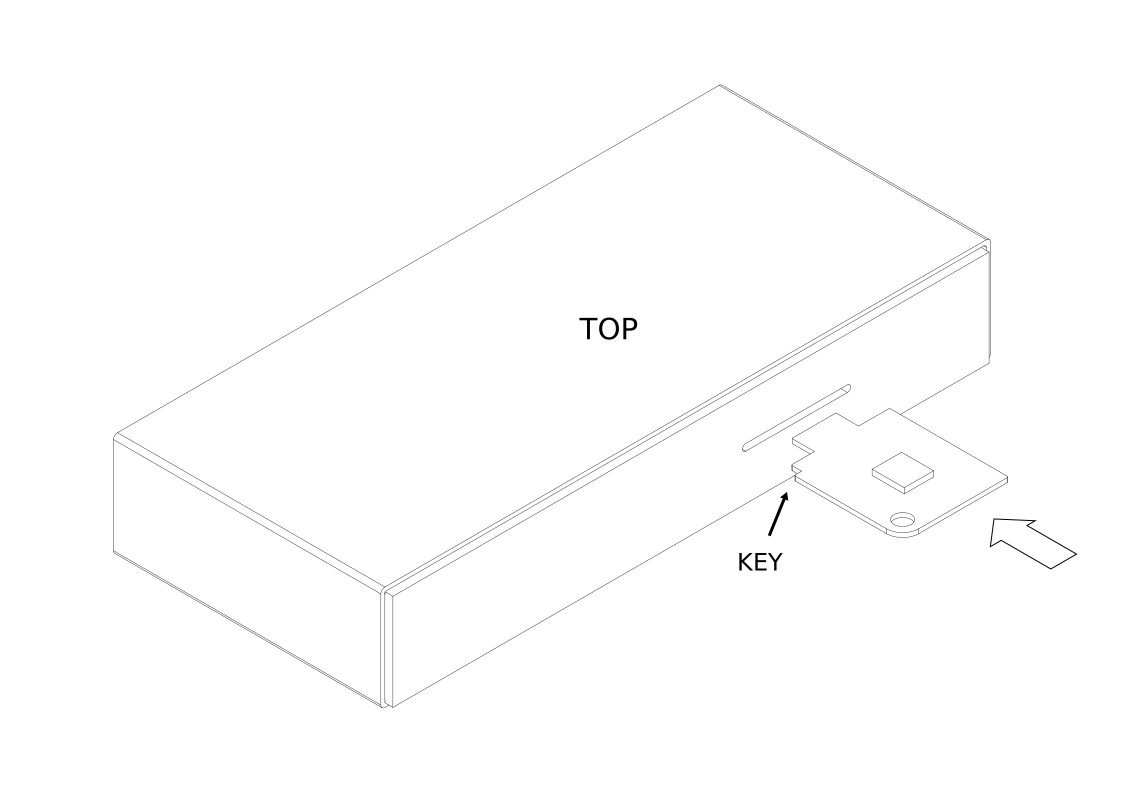
Gently insert the cart until it blocks, according to the pictures below:
Inserting the cart:
Card inserted:
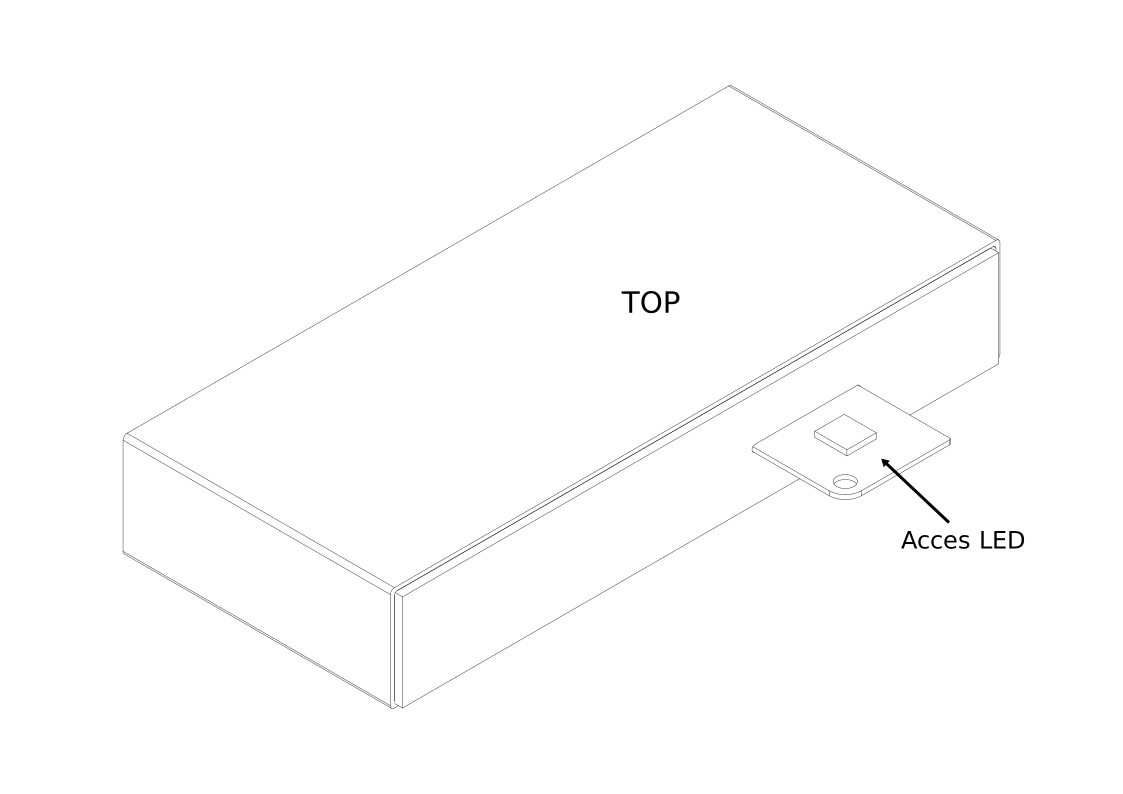
When the cart is acceeded, it embedded LED lights ON. When the cart is inserted, the CART button blinks, then CART storage can be selected.
Why is my WoFi not displaying or recognizing the cartridge?
Ensure that the cartridge is correctly inserted into WoFi. Reboot the device if necessary.
How do I manage and optimize storage on WoFi?
Delete unused samples and patches, and back up your data frequently via mywo.fi or locally with the WoFiManager.
How do I update the firmware on my WoFi?
Update procedure is described in the user manual. There is also interactive help in mywo.fi / device / update section.
Easier way to achieve update is to send firmwares directly from mywo.fi. Second way is to pull them from the WoFi menus. Third way is to apply the updates through USB using WoFiManager application.
What should I do if the WoFi's firmware update fails?
Restart the device and retry, ensuring a stable power connection.
Firmware versions are displayed in the Settings / Info of the devices, or directly in mywo.fi when the device is connected.
How to setup the link between my WoFi and mywo.fi?
- make sure you have your battery full charged, or plug the AC adapter to no interrupt the process
- create your mywo.fi account if not already done
-
on your WoFi:
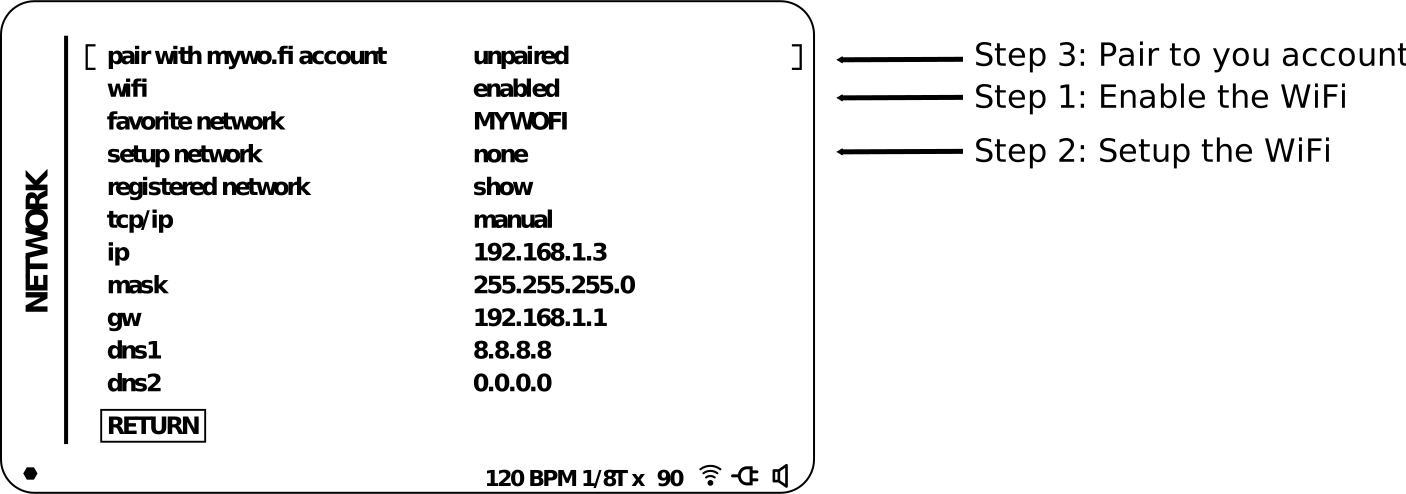
- enable the WiFi in Settings > Network > Wifi
- setup the WiFi in Settings > Network > Setup network
-
pair to your account
-
using a smartphone:
-
display the pairing QR-code (Step 3 above)
-
scan the QR code:
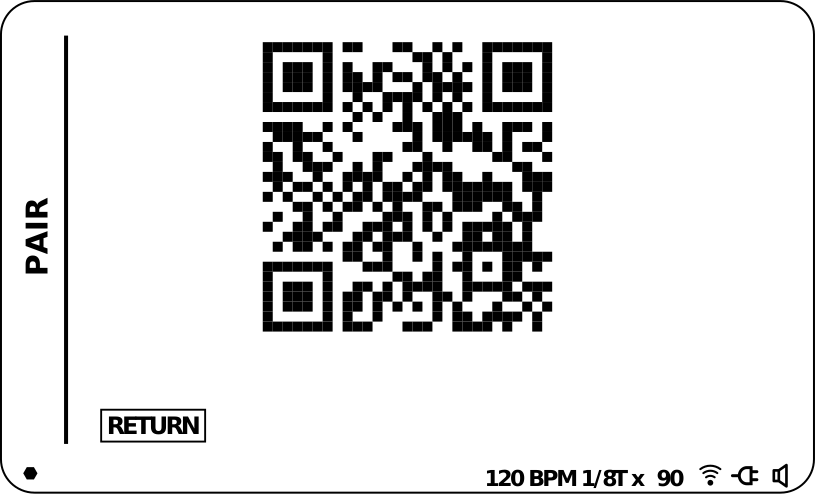
- connect to your account and follow the process
-
-
using a computer:
- display the URL using Menu button:
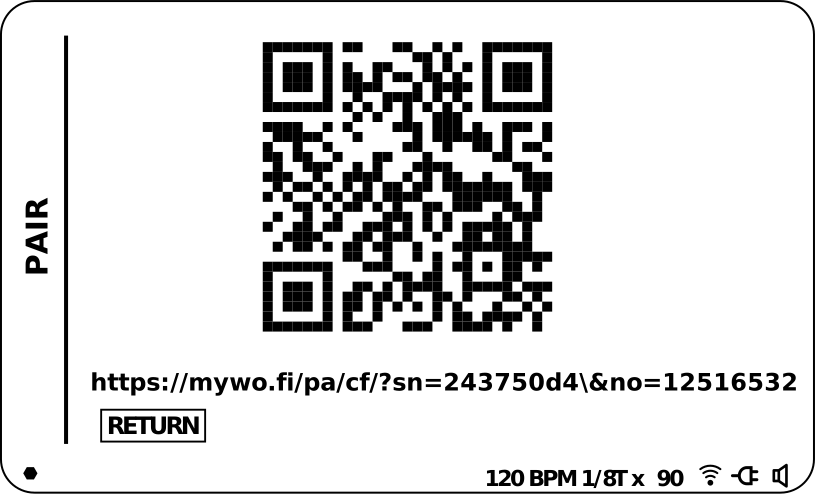
- type the adress into the browser
- connect to your account and follow the process
--
What should I do if my WoFi is not connecting to WiFi?
- Check that the WiFi is enabled and that the correct network is selected.
- Restart the WiFi router
- Restart the WoFi
If the issue persist, setup the wifi settings again, from the menu or through WoFiManager application
How can I fix WiFi connectivity issues with mywo.fi?
Ensure the device is within WiFi range and check your network credentials.
How can I improve the WiFi connection stability on WoFi?
Ensure a strong WiFi signal and minimize interference from other devices.
What are the best practices for battery maintenance?
Avoid deep discharges, charge regularly, and store the device in a cool, dry place.
My battery died, what can I do?
Refer to the manual for instructions on replacing the battery and information on the type of battery required. Be very careful about the polarity as you could damage the internal circuit board.
How do I properly maintain and clean my WoFi?
Use a soft cloth or a brush for remove dust. The display glass can be cleaned using a slightly damp wipe.
Avoid detergent or solvants.
How do I protect my WoFi during transportation?
Use a hard-shell case or padded bag, and avoid exposing the device to extreme temperatures and humidity.
For air travel, be sure to follow the airlines' rules regarding Li-Ion batteries. Remove the battery is needed.
Make sure the polarity is correct when reassembling
What should I do if the WoFi does not power on?
Check the power adapter and try resetting the device.
What should I do if the WoFi overheats?
Turn it off, allow it to cool, and ensure proper ventilation.
What should I do if the pads, buttons, switches, encoders, or faders are unresponsive?
Check if you are in a locked view which may disable certain controls. Press EXIT to leave this context.
How do I perform a factory reset on WoFi?
Follow the steps in the manual to initiate a factory reset from the settings menu.
If the issue persists, please contact our support team for further assistance.