Explorer tab
In this tab, you can explore all the samples, patches, and soundbanks made public by the community.
The interface includes the following elements (detailed below):
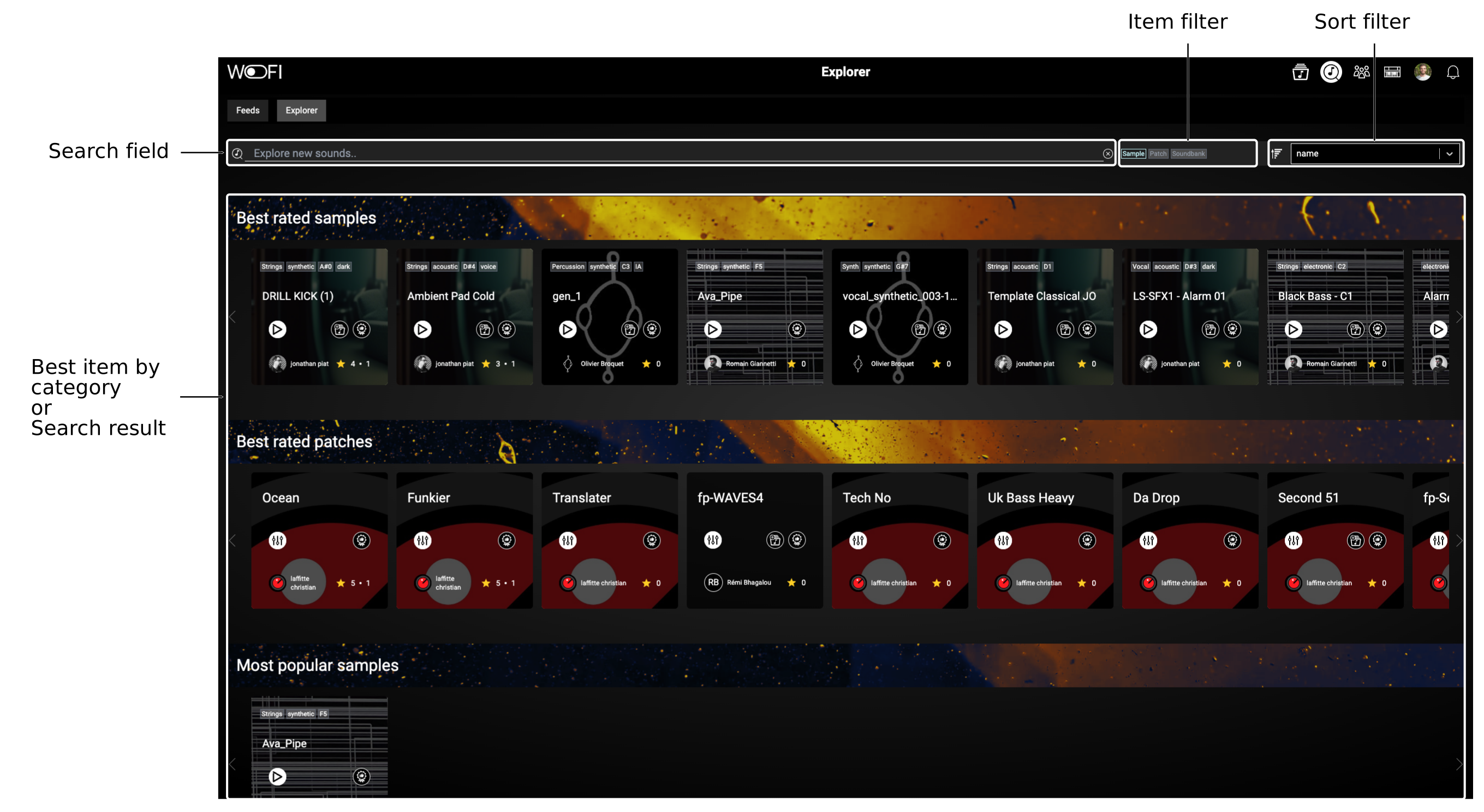
You have two ways to discover new items:
- Browse the different sections (visible when the search field is empty).
- Search using keywords (results appear when the search field is filled).
When you find something that catches your attention, you can listen to it, view its settings, add it to your library, or recommend it to another user. Alternatively, you can click on the item to go to its page for more options.
The different sections
The available sections are currently fixed and include the following:
- Best rated samples
- Best rated patches
- Recommended samples
- Recommended patches
- Last samples
- Last patches
- Soundbanks of the week
Searching through the public assets

Using the following search zone, you can:
- Search either by name of the item, its creator or its tags in the search field.
- Filter the type of item (sample, patch or soundbank), from the item filter.
- Sort by ascending/descending order, from the sort filters.
- Select by which value the list of items should be sorted (name, date, rate or creator), from the sort filters.
Here is an example where we search for a sample containing "ava" in the name:
